

Free fleet fuel tools: live fuel prices, route planning and mileage calculator
Live fuel prices on a map, routes you can send to a driver’s phone, a mileage calculator and an MOT-centre map. See our free online tools, no Quartix account needed.
Live fuel prices on a map, routes you can send to a driver’s phone, a mileage calculator and an MOT-centre map. See our free online tools, no Quartix account needed.
Fuel is the cost you feel every week. The CMA’s August 2026 road fuel report found pump prices had come off the spring peak, but were still well above where they sat before the Middle East conflict. DESNZ weekly figures in late August put diesel around 183p a litre and petrol around 162p. On the same day, a supermarket pump and a motorway service station can be several pence apart.
You also pay for the long way round, and for mileage claims that are just a number typed in on Friday.
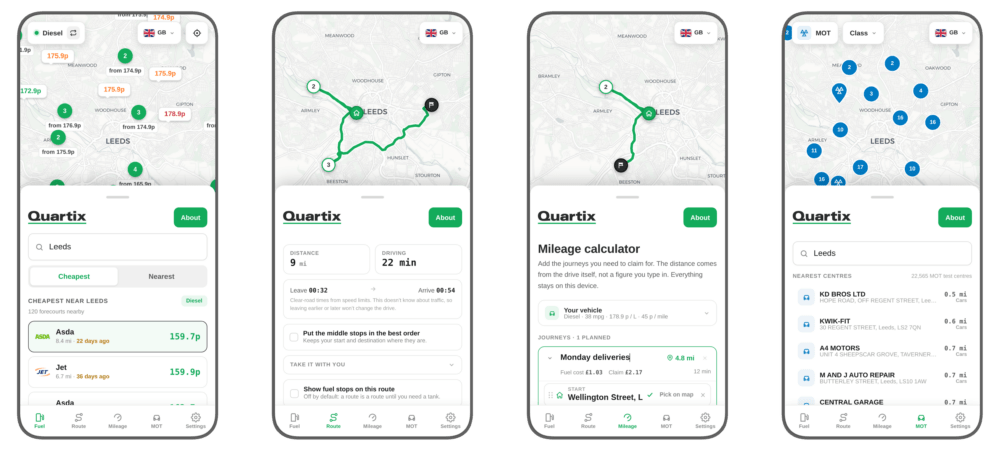
Our new free fleet tools, at fuel.quartix.com, give you: live fuel prices on a map, a route planner you can send to a driver’s phone, a mileage calculator, and a map of nearby MOT centres. These are free online tools for anyone to use, no Quartix account or tracking subscription needed.
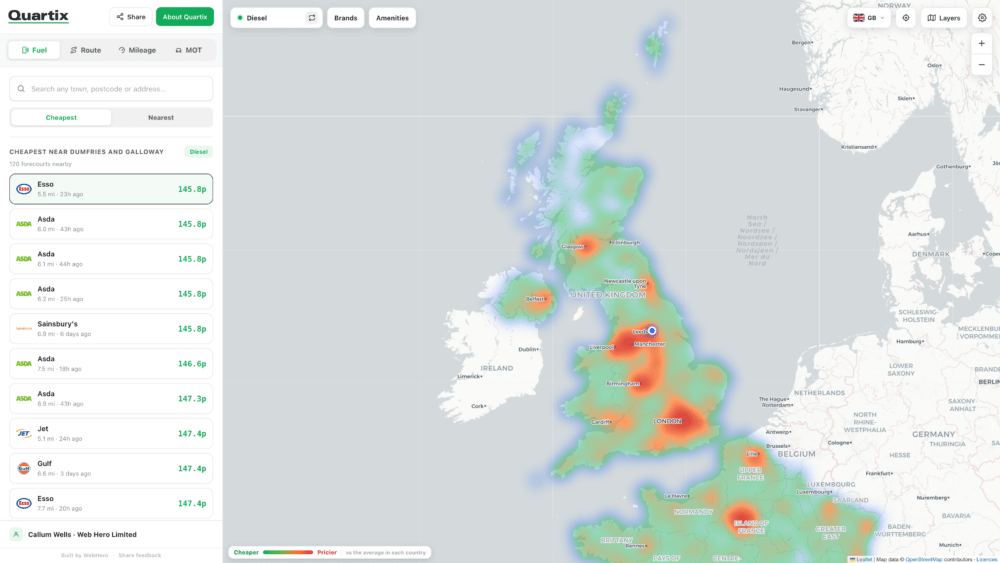
Open the map and search a postcode, a town, or “near me”. You get live UK prices for petrol, diesel, super and premium, cheapest first. Filter by brand, 24-hour opening, AdBlue, LPG, car wash, air, toilets or a shop. Tap a station for hours, facilities, a phone number and directions.
Turn on the heat map and you see which parts of the country are expensive. This view allows you to see how your area compares nationally.
France, Spain and Italy are on the same map if you run abroad.
Prices come from the published feed. The map shows when it last updated. And if a price has gone stale, it’s clearly marked so you are not driving out of your way for a figure that expired on Tuesday.
Add a start, a finish and up to 50 stops in between. Keep your order, or let the planner rearrange the middle of the day for the shortest drive. If your order of stops was already the best one, it says so.
Paste a list of addresses from a spreadsheet or a job sheet instead of typing them one by one.
Where there are live prices on that route, the tool flags the stations worth stopping at, so a fill-up is part of the drive.
You can send your route as a link or a QR code. It simply opens in Google Maps on the driver’s phone with nothing to install. If the afternoon changes, they can replan it themselves.
Routing uses public road data and speed limits, rather than live traffic. The travel times assume a clear road. To see how long the journeys took your team retrospectively, see our vehicle tracking system features.
With a grey fleet, the claim is often a mileage figure the driver typed in. Our free tool gives you a route to check it against.
You can build the journey in the calculator the same way you would in the planner. The distance comes from that route. You then get the fuel cost, from the vehicle’s economy and the pump price, and what the trip is worth at your mileage rate.
Defaults are miles, mpg, pence per litre, and a rate you can change. The pump price can come from the live median or you can put in the rate you actually pay.
For 2026/27 HMRC raised Approved Mileage Allowance Payments for cars and vans from 45p to 55p for the first 10,000 business miles (announced in May 2026 and backdated to 6 April 2026). After 10,000 miles it stays at 25p. Check the published HMRC rates before creating your company policy.
You get a claim that shows where the journey went, not only how far someone said it was. If you need business and private miles split automatically, drivers can mark trips in the Quartix mobile app.
When a van is due and your usual garage is booked, use the MOT map. Search where the vehicle is, or where it will be later. You get nearby test centres, opening hours and a number to call.
Filter by class, so you are not ringing a Class 4 bay for a van that needs Class 7.
You get centres that can do the test, close to the route you are already running. If you want the reminder before the van is due, fleet management reports can schedule MOT and service dates from recorded mileage.
Update: We’ve added a new feature to check the MOT and Tax dates of your vehicles, you can check multiple at once and export via PDF for offline reference if needed.
Put Monday’s actual stops into the planner, with the real start and finish. See if your order is already the shortest. Check the stations it flags against where you usually fill up. If the heat map shows the depot in a dear area, look at whether a regular run already goes through a cheaper one.
Send the link to the driver. If a job drops mid-morning, get them to replan it.
Then put last month’s mileage claims through the calculator, using the pump price and the rate you pay. Compare the route distance with the figure that was submitted.
If you run to France, Spain or Italy, plan one of those trips on the same map and see whether your usual fuel stop is still the one to use.
Use the map before you fill up. Plan the day before you send the driver out. Put the claim through the calculator before you approve it.
We made these tools free for anyone to use, no account, no commitment, and completely separate from Quartix tracking. We’ve spent 25 years helping fleets run better, and these felt like genuinely useful resources to share. And whenever you want the full picture – real-time tracking, real journey times, and a clear view of what every vehicle costs your business – our vehicle tracking system is ready when you are.
Check out the free fleet fuel tools at fuel.quartix.com and see the difference on your next fill-up, your next route and your next round of mileage claims.

We’ll help you decide which vehicle tracking option is right for you


Top-rated fleet tracking, zero setup fees. Limited time offer for new customers.
Get the discount